

Disclosure: Some links on this page are monetized by the Skimlinks, Amazon, Rakuten Advertising, and eBay, affiliate programs, and Liliputing may earn a commission if you make a purchase after clicking on those links. All prices are subject to change, and this article only reflects the prices available at time of publication.

The Toshiba Mini NB505 is a new budget laptop from Toshiba which starts at $299. The mini-laptop features a 10.1 inch, 1024 x 600 pixel display, 1.66 GHz Intel Atom N455 CPU, 1GB of RAM, and a 250GB hard drive and runs Windows 7 Starter Edition.One of the only real distinguishing hardware features is support for SDXC flash cards as well as SD, SDHC, and MMC cards.
I got a chance to check out the netbook at CES last week, and while it doesn’t really stand out from the crowd in the specs department, it’s a nice looking little laptop with several colorful lid options including blue, brown, orange, turquoise, and green. It also has a decent keyboard — although it’s not the chiclet-style keyboard Toshiba uses for its higher priced netbooks.

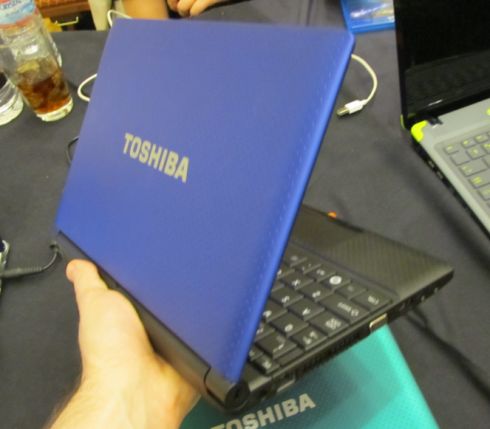


The netbook weighs about 2.9 pounds and measures 10.3″ x 7.5″ x 1.4″ and feels reasonably light for a netbook with a 6 cell battery.
The Toshiba Mini NB505 is available from Amazon.com for $299.99
Now you’re being ridiculous. I have about 50GB of data on this card and it works fine. If the card was fake I would have noticed by now. Most laptops sold within the last few years can handle SDXC cards. There’s nothing special about the card reader in my EEE PC, nor is there anything unique about the Toshiba NB505.
Industry specs are not ridiculous and there are fake SD cards sold regularly! Your claims go against those industry specs and I’m more than familiar with Eee PC’s. The T101MT was the first model given a SDXC compatible reader. While your model came out before the SDXC spec was released. So yes I question the validity of your claims because it is unlikely unless you upgraded to Windows 7 and installed the needed SDXC driver patch.
https://www.sdcard.org/developers/tech/sdxc
As for the Toshia NB505, yes, nothing special as those specs are pretty standard now but it’s basically just an update.
I am well aware that scammers sell fake SD cards and I would have noticed if the card didn’t work. The 64GB card works fine in all my computers. And yes I did upgrade the OS on the EEE (not to Windows 7 though).
If you’re aware of the scammers then you should not find it surprising or silly that I questioned your results and you should take factors like OS and drivers into account before claiming there is nothing special about a new SD format.
Besides, using a small sample to judge an entire standard can be misleading. Like just because your system can use a 64GB card doesn’t mean it’ll be compatible with all SDXC cards with the standard supporting up to 2TB capacities.
Also even if your system is fine using this card, doesn’t mean it’s fine for the card. SD cards are more prone to corruption and failure than USB drives.
SDHC was originally specified up 2TB, but older versions of Windows XP/Vista had problems formatting cards above 32GB. So these cards were relabeled as “SDXC”. There really is no difference in the hardware. Most devices do not care if the card is more than 32GB, as long as you format the card with a FAT32 filesystem. I’m sure there are a few that have problems, but the majority do not.
Issues I see that could factor is you need a OS that will recognize and use “exFAT” without corruption. Not all drivers for using a specific format for a an OS always work at 100%. You can use more compatible drive formats but few can use the full capacity as a single partition and some OS’es may only recognize and use the first partition from a Flash Memory device.
You’re right about SDHC theoretical max but compatibility is not guaranteed as physical compatibility is not the only factor to consider and when they release the SD 4.0 specification update for SDXC then you will run into “SDHC hosts will only support the SDXC cards which use UHS104 speeds”.
The card you are using now is only using the present SD 3.0 specification.
The newer specifications also add more pins…
https://www.zdnet.co.uk/news/storage/2011/01/06/ces-sd-card-spec-to-triple-transfer-speeds-40091320/
The EEE PC can’t do UHS speeds, I think it’s limited to 25MHz. There’s no problem reading cards at the lower speed, they are backwards-compatible.
A lot of devices won’t handle the exFAT filesystem, but you can format the card with FAT32. Linux-based devices (Android, etc) are fine with this, and can use the full capacity as a single partition.
Recognizing only the first partition is a known bug in Windows XP, and a lot of cameras. It’s not really a big problem. I usually use smaller-capacity SD cards in my camera anyway, since I don’t take thousands of pictures.
BTW the same issues come up with other media, eg CompactFlash. No one ever thought to label 64GB CF cards any differently. “SDXC” is just a marketing thing that the SD card association came up with. There really isn’t any difference from a technical point of view, the spec is the same.
https://news.cnet.com/8301-30685_3-20027455-264.html
The the SDXC difference is mainly from the point of view of the specification standard for the drive and whether the OS will recognize that specification. Not really an issue except for drives that will only recognize up to 4GB SD cards, since there was a hardware change when they introduced SDHC. But SDXC will also change when they start adding more pins to triple transfer speed and thus making it more than just marketing.
Problems with FAT32 is it degrades over time and isn’t what you would want for a large capacity drive. OS like XP will also have other limits with FAT32. Never mind less security and you can’t do things like compress with Microsoft DriveSpace or DriveSpace 3.
So someone using Windows would prefer NTFS but that isn’t fully compatible with other non-Window OS’es. Though Linux’s 3rd party driver can handle NTFS pretty well it can still have a small percentage of issues and larger capacity drives may bring that up more than smaller. While those using yet other OS’es may have fewer options…
Comparison to SD cards is misplaced, CompactFlash interface is a 50 pin subset of the 68 pin PCMCIA connector, which allows for the drive to be very flexible in design. Like CF cards ranged from flash memory to Micro Drives (HDD crammed into a CF card). Meaning it can more easily adapt to any internal changes without changing the interface and that makes the main issues with CF cards the physical size (Type) and speed rather than capacity.
UHS-II cards will have more pins for faster transfer speeds, but these are not expected for at least a year.
CompactFlash uses a PATA interface similar to hard disks, but that isn’t really relevant. The issues with FAT32 and NTFS and compatibility with various operating systems apply to CF just as much as SD or anything else.
UHS-II is still a hardware interface change that will be applied to SDXC. So specification is more than just a capacity excuse.
While CompactFlash isn’t just a PATA interface, but the point is they didn’t have to change the interface in a way that would affect compatibility. While SD cards have gone through changes and will again by next year.
While internally CF also differ because it hasn’t always been a NAND device.
So it’s more accurate to say SDXC has some overlap with SDHC but by next year they will diverge enough to cause compatibility issues beyond just what format the OS can support and this should coincide with the further increase of capacity. So you may not be able to use cards much larger than you have now.
There’s nothing special about SDXC cards. My EEE PC 900 that I bought in 2008 reads them just fine.
No, SDXC allow for capacities up to 2TB. The reader in your 900 is only rated to read up to SDHC capacities, which max out at 32GB.
Even if your system recognizes the card doesn’t mean it can use it to its full specification. Like you can also use a Class 10 card but the actual performance speed will only be up to what your reader is capable of handling.
A 64GB card works just fine in in my EEE 900. And yes, it sees the full capacity.
Again, it doesn’t mean you can use the full capacity! Your reader isn’t rated for the new specification. Also be careful you don’t have a fake SDXC card…