


The HP Mini 1000 is Hewlett Packard’s second entry in the netbook space. The HP 2133 Mini-Note was one of the best looking netbooks around, with its sturdy aluminum case and high resolution 1280 x 768 pixel 8.9 inch display. But the netbook was hampered by its slow VIA C7-M CPU and its relatively high price tag (models ranged from $499 to over $800, which is a lot for a netbook). I’ve been spending the last few days using an HP Mini 1000, which I’ll be giving away soon as part of the HP Magic Giveaway. And I have to say, HP got a few things right with their second go around. But the company also made a few compromises that I find odd.
HP allows you to choose several different configuration options for this netbook. But the unit I reviewed has a 10.2 inch, 1024 x 600 pixel display, 1GB of RAM and a 60GB HDD.
Design
The HP Mini 1000 is one of the thinnest and lightest netbooks around, weighing just 2.25 pounds and measuring just 1 inch thick. That puts it squarely in the same territory as the Asus Eee PC S101 when it comes to size and weight. But the S101 has a starting price of $699, while the HP Mini 1000 starts at just $359.
But in order to keep the price and weight down, HP replaced the sturdy aluminum chassis used in the HP 2133 with a cheaper plastic case. While it’s attractive enough, it just doesn’t feel as solid as an aluminum case. And I find the plastic keys aren’t as satisfying type on as the keys on the HP 2133. But more on that in a minute.

The super-thin design of the HP has also lead to a few other baffling design choices. For example, the HP Mini 1000 comes with a solid state disk or a hard drive. HP decided to go with a 1.8″ inch hard drive in the HDD models in order to accomodate the netbook’s small size. But that means the maximum storage capacity is 60GB and you wind up with a 4200 RPM hard disk, while most comparable netbooks have 80GB, 120GB, or 160GB hard drives which spin at 5400 RPM.
HP has also skimped a bit on the ports. The HP Mini 1000 has just 2 USB ports, while most other netbooks have three. You’ll need to purchase a separate VGA adapter if you want to plug in a monitor. And instead of two distinct jacks for a mic and headphones, there’s a single combo jack.
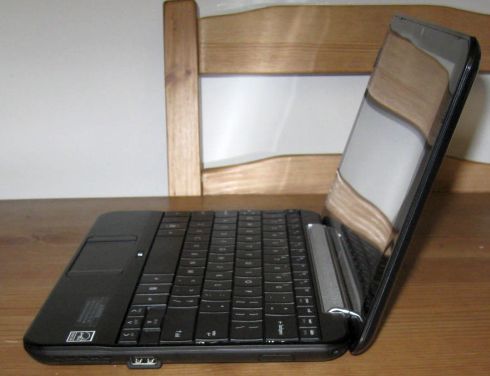
The mini-notebook also has one of the best speakers you’ll find on any netbook thanks to a unique design that combines the speaker and the screen hinge. Because the the speaker is out in the open, you get louder and crisper audio than you’ll find on netbooks with the speakers buried on the bottom of the computer.
Overall, the HP Mini 1000 is one of the nicest looking netbooks I’ve seen thanks to its slim design and the attractive pattern on its glossy lid. But personally I’d prefer separate headphone and mic jacks, a VGA port, and an extra USB port. And while I’m not an engineer, it certainly looks to me like there’s room on the chassis for a few of those elements.
Display
The HP Mini 1000 has an excellent 10.2 inch, 1024 x 600 pixel glossy display. You can adjust the heck out of the screen brightness, with the dimmest setting being barely visible in a modestly lit room and the brightest setting being almost bright enough to hurt your eyes. Note that because the netbook has a glossy screen, you’ll likely have a hard time viewing it in direct sunlight.

HP also offers a version of the netbook with an 8.9 inch display with the same 1024 x 600 pixel resolution. The HP 2133 Mini-Note had an 8.9 inch, 1280 x 768 pixel display that was incredibly sharp. In fact, I often found it too sharp and wound up squinting to read the screen. But I do wish that HP would have at least offered customers the option of paying extra to get a higher resolution display for the HP Mini 1000. I know some folks would really appreciate the higher resolution, and I have a feeling it would look better on a 10.2 inch display than an 8.9 inch screen.
Keyboard and Touchpad
At first glance, the HP Mini 1000 has one of th ebest keyboards you’l find on any netbook. The keys are nearly full sized, thanks to the way HP uses the full width of the device to accomodate the keyboard with almost no unused space on the sides. But as I mentioned, I find that the keys don’t feel quite as responsive as the keys on the HP 2133. And I actually prefer the typing experience I get on the Asus Eee PC 1000H, which has keys that are a bit higher and indented like you’ll find on most non-Macbook keyboards. The HP Mini 1000 keyboard has flatter keys.

One thing that I know will make some users very happy is the enormous Enter and Shift keys on the right side of the netbook. Asus and several other mini-notebook vendors have often been criticized for shrinking these keys or putting them in awkward locations.
And one thing that annoys the heck out of me is that little button just above the touchpad. You can press it to enable or disable the touchpad, which is a nice feature. But it has a glowing LED that can be incredibly distracting.
Speaking of the touchpad, HP has decided to stick with the long and narrow touchpad design used in the HP 2133 Mini-Note, with the buttons on the left and right sides instead of directly below the touchpad. While this provides more room for the keyboard, some folks find it awkward to have the buttons so far apart. Personally I don’t mind this layout that much, but then I also typically carry a travel mouse in my backpack for times when I need to do some serious audio or image editing.
Battery
While most netbook makers have opted to place the battery near the back of the unit where it can protude from the rear or bottom, HP has built a 3 cell battery that fits flush with the laptop by fitting into a slot beneath the computer. The result is a thinner netbook. But it also means that when HP releases an extended 6 cell battery (which the company is expected to do sometime in the next few months), it will add a bit of bulk to mini-laptop.

In terms of battery performance, the HP Mini 1000 does quite well. I estimate that you’ll get between 2.5 and 3.5 hours of battery life if you use the netbook primarily to surf the web, edit documents, and do other basic tasks. CPU-intenstive tasks like watching video will run down the battery faster. I watched a 44 minute video from Hulu.com and watched the battery meter go down to 56%. You’ll probably be lucky to get two hours out of the HP Mini 1000 with a standard 3 cell battery if you plan to spend those two hours watching online video.
I also ran the Battery Eater Pro test, which taxes the processor pretty heavily, and the netbook died after about 1 hour and 56 minutes. But again, I suspect you’ll get closer to three hours of battery life if all you use the netbook for is web surfing. You may even be able to eke out a bit of extra life if you turn off the WiFi and use the notebook for offline tasks.
The battery does get a bit warm when you run CPU heavy tasks for a little while, but the HP Mini 1000 doesn’t get unreasonably hot, especially when compared with the HP 2133 Mini-Note which sometimes got ridiculously hot. The part of the HP Mini 1000 that seems to get the warmest is the area directly below the touchpad. But again, this is far from the hottest netbook I’ve used.
Software
HP does not load much software on the HP Mini 1000. You get a copy of MS Works and that’s about it. Noticeably absent is any sort of software for overclocking or underclocking the computer. Asus, MSI, and many other netbook makers let you take advantage of the Intel Atom processor’s adjustable clock speed by pressing a hardware button to overclock or underclock the machine, or by using a software utility. This lets you boost performance a bit when you need it, or slow down your CPU a bit to prolong battery life. HP doesn’t give you any such option.
Another feature I’ve grown accustomed to seeing on netbooks is some sort of on-screen indicator to let you know when you’ve adjusted the volume or screen brightness. While it’s pretty obvious that the screen brightness goes down when you hit Fn+F3 and up when you hit Fn+F4, I’d really like to see some sort of visual cue to let me see the volumelevels when I hit Fn+F10 or Fn+F11.
Performance
The HP Mini 1000 performs pretty much as you’d expect a machine with a 1.6GHz Intel Atom CPU, 1GB of RAM, and a 4200RPM had drive to operate. Applications launched fairly quickly, I had no problem loading web pages, and I was able to surf the web using Firefox with more than 4 or 5 tabs open without any slow downs, or run several programs including Firefox, Skype, and IrfanView simultaneously without any problems.
This isn’t the fastest machine around when it comes to startup times. It took about 60 seconds to reach a fully usable Windows XP desktop after I hit the power button. Shutdown was much zippier, taking about 12 seconds.
The built in microphone worked fairly well when making a test call with Skype in a quite room, but I wouldn’t recommend using the HP Mini 1000 or any netbook to make VoIP calls without a headset if you’re in a noisy environment. The machine’s fan is also audible, but it’s not exactly the loudest computer fan I’ve ever heard. And I imagine it’s just a matter of time before someone comes out with a utility like eeectl or A1Ctl that will allow you to adjust the HP Mini 1000’s fan and CPU speed the way you can with an Eee PC or Acer Aspire One.
Verdict
If size is your only concern, you should totally check out the HP Mini 1000. It’s small, light, and incredibly attractive when compared with similar netbooks like the Asus Eee PC 1000H. The HP netbook has a screen and keyboard that are at least as large as the Eee PC’s, but the Eee PC 1000H absolutely dwarfs the HP Mini 1000 in terms of size, as you can see in the pictures below.

But when it comes to other factors like battery life, hard drive capacity, and expansion, the HP Mini 1000 doesn’t fare as well against its competitors. While the netbook gets excellent battery life for a machine with a 3 cell battery, HP has yet to release the extended 6 cell battery, which means netbooks like the MSI Wind U100, Asus Eee PC 1000H, and Samsung NC10 can run for twice as long on a single charge.
If you need more than 60GB of storage, you may also want to look elsewhere, or at least invest in a high capacity SDHC card. And if you need to plug in more than two peripherals, you’ll need to pick up a USB hub. While you’re shopping, you may also want to look for a laptop case or slipcover, as HP doesn’t include one. I know it’s a little thing, but I really appreciate it when netbook makers include at least a flimsy slipcover to help keep the computer from getting scuffed up when you toss it in a bag.
It’s also worth noting that while the HP Mini 1000 has a starting price of $359, that model comes with an 8.9 inch display. You’ll have to pay more than $400 to get a model with a 10.2 inch display, and you’ll have to cough up even more money if you want additional storage or other features like a built in 3G modem.
Or if you want to pick up an HP Mini 1000 without paying a dime, you can enter the HP Magic Giveaway contest. Dozens of participating sites are already running contests to give away the HP Mini 1000 along with several full sized laptops and an HP TouchSmart media center PC. We’ll be launching the Liliputing contest on Wednesday.
HP Mini 1000 and Asus Eee PC 1000H comparison photos
Because these happen to be the two netbooks I have in my house at the moment, I figured I’d snap a few shots of the two mini-laptops together so you can get a better sense of how they compare in terms of size and design:
I anticipate book computers, failing with a touchscreen interface and keyboard, ability be a accomplished abstraction too. If Apple would accompany out the ample awning Wifi based home-bound iPod blow we could acquisition out how able-bodied these would sell. Probably not too able-bodied unless they’re cheap, and humans accept one just to leave on the coffee table for web browsing. Again though, blow makes sense.
buy cannabis seeds
I got mine yesterday, I like it so much, however, a web cam too dark to use as you said. I hope not to correct or update the firmware in the near future.
internet marketing
I bought my mini about 3wks ago and its freezing up on me. It works great but if I leave it sitting for just a couple of minutes it freezes and nothing works the only to get it to work again is to turn it off manually and restart it. If anyone has a solution please let me know. Thanks
I just got my hp mini and about a week ago it started to freeze up on me it works great but if i let it sit for a couple of minutes without touching it thats when it happens and the only to get it to work again is to turn it manually and restart it. If anyone has a solution please let me know. Thanks.
I just bought the HP Mini 1000 with the 8.9″ screen for $280 from Best Buy. I love the design and the keyboard, but it is so slow. Painfully slow. It took 44 seconds to load a short 2 minute video on youtube. Web pages take forever to load and forget having more than one application open – it freezes for a whole minute before it finds it’s ass again. So I use it to take notes in class and that’s pretty much it…. It’s cute, but not worth it.
Type-O: “And I find they plastic keys…”
Anyone know which of the SDD drives coming onto the market would work in this? Don’t need an upgrade but am curious.
I’ve had mine for a few weeks (thanks, Brad, for posting that sale info!) and love it. It is an upgrade to my Asus 701 4GB and an order of magnitude improvement – screen, keyboard, keyboard configuration – I HATE the right page up / shift key config. I bought it with the 1 GB RAM, 16GB SSD which is more than enough for my travel and around town needs. It is not a speed demon but that’s not important. I love the weight, the slim case and the speaker position because I can’t use earphones. 2.5GB of music and the rest of the HD available for whatever. I can always use a 16GB flash drive or a 16GB SDHC if I need more storage.
My biggest gripe is the power cord – a long, bulky, relatively heavy electrical cord that plugs into a tiny box which has a long single cord coming out of it. HUH? Who needs a 10 or 12 foot cord, and especially one that is so bulky. I went to Radio Shack to see if I could replace the electrical cord with a shorter version (it unplugs) but this is the same as theirs – another place where companies are making odd off-the-shelf parts choices. Please, please, do something about this! Next time I’m overseas I’ll see if there is something better available.
Also, even though it has XP SP3, it won’t connect WPA 2. That’s a software issue but one you should be aware of if it matters. Connects just fine to WEP.
The other things I would change, which are nit-picky, would be to get rid of that absurd empty space for a proprietary HP jump drive – you could fit another USB drive there or move the existing one and add separate audio/mike drives. The light above the touch-screen is annoying, especially since I always use a mouse. The case should be matte, the screen less reflective. One day I’ll find out what that huge expansion slot is for – or not.
As a follow-up to my earlier comment about the overly long bulky power cord, I found a seller on eBay who has 1 and 3 foot versions of what appears to be it. I’m buying both. With shipping, they will be $18.
You can search eBay for Compaq/Dell/HP AC Adapter/Power Cord 3 Pin/Prong or for member named: all-monitors or email him at [email protected] He doesn’t have the short ones posted but, if you ask him, he’ll respond promptly. You can pay via PayPal.
Sweet!
I received the cables today – a 3 foot and a 6 foot. Bummer. Can’t trust the seller, who now says a 1 foot doesn’t exist.
In any case, happy to have the 3 foot, which says Dell Part #3J437. I just Googled that and came up with a bunch of them – they may be used.
Less than 4 hours with my new Mini 1000. First blush: I love it. It reminds me of an HP Omnibook 800 on steroids. I got the fully maxed out solid state version (incl. 8gb removable).
After maybe 30 minutes, I was typing on the keyboard without any slowdown. Though there are a few new keys to find such as fn-down-arrow for PgDn. The feel of the keyboard is excellent. Again, surprising me despite the positive reviews I’ve read prior.
The sound is surprisingly good. Probably the best available for a netbook.
We need a portal site for all things Mini 1000! One place to keep track of all updates and 3rd-party enhancements.
With all the multitouch craze going on, I wouldn’t be surprised if HP introduces the Mini 1000 MIE with a touchscreen upgrade option. The MIE UI looks just like the SmartTouch UI. It’s clear that they designed a winner there.
The only problem is how much of the Linux that they tweaked for MIE will enable touch input. This could pave the way for a true XP alternative that doesn’t feel like a downgrade in exchange for a price break. As someone pointed out, the price break is quite small probably due to HP’s MIE development costs. So, it is more of a brand differentiator for HP to have the MIE.
I also think the Mini-Note will get a touchscreen upgrade option (possibly capacitive). I got an e-mail from HP advertising a deal on the 2133 – buy one, get the 2nd for 1/2 price. Reducing inventory is always a sign of a new offering in the works.
With Asus already claiming that they will have a touch Eee soon, I would think that HP would want to beat them to the gate by bringing one out by CES. It seems that HP already have all the HW and SW they need to pull it off flawlessly.
If they introduce touch as an upgrade option (like they did with the size upgrade from 8.9″ to 10.2″) instead of calling it a new model, they can still claim respectable profit margins while presenting it as a $339 MIE or $449 Mini-Note. (This is contrast to the Asus approach which looks scatter-brained and unprofessional to be releasing new models every 2 weeks (kind of like let’s throw as much as we can out there, and see what works).) Only after the customer configures the MIE with 2GB RAM, touch, 10.2″, 6-cell, 16GB SSD, BT, 3G, etc. will he realize that he is up to $699.
By doing so, HP will have its cake and eat it too. They won’t cannibalize their notebooks (after all a TX2 is still more of a computer than any new Atom or Via Nano Mini-Note), and they will still be competing in the low-end with the rest of the herd (but with a custom OS, MIE, as their differentiator).
I don’t really understand the fetish for touchscreens on notebooks myself, at least other than the modders doing it just to prove it can be done.
I agree with Apple. I just want multi-touch support on my trackpads, in fact I expect it and think that netbooks without it (since they will generally be used without keyboards) aren’t designed correctly.
I think Kitchen PCs, all-in-one uprights with an easy to clean touchscreen interface, are great ideas. But you won’t be spending a lot of time doing stuff with it, just leaving notes for each other, launching TV shows, or pulling up directions, movie times, recipes, etc. Make one with an Atom CPU to keep the costs down and sell it for a low price and you’ve got another PC in people’s homes.
I think tablet computers, lightweight with a touchscreen interface and keyboard, might be a fine idea too. If Apple would bring out the large screen Wifi based home-bound iPod touch we could find out how well these would sell. Probably not too well unless they’re cheap, and people have one just to leave on the coffee table for web browsing. Again though, touch makes sense.
But a laptop with touch? Why? The mouse or trackpad or trackpoint works fine! I’m probably doing dedicated tasks for relatively long periods, not pushing a great big button once in a while. Unless you all have more developed muscles, your arm is going to get real sore holding it up in the air for long periods. And that glossy screen will show all those fingerprints really clearly…
I have read several reviews on the HP 1000 but I have not seen anyone address the option of SSD vs. HDD. I don’ t want to use the device as a movie player or for music. I have been to the HP site and they have an option of adding a 16GB SSD drive and dumping the old spindle hard drive.
Wouldn’t the SSD be faster? If so how much faster?
Wouldn’t the SSD save battery? If so how much battery?
Wouldn’t the SSD last longer cause there are no moving parts?
Yes and no to all of your questions. First, let me state that the review
unit I received had a hard drive, so I can’t tell you exactly how the SSD
models function.
But in general, not all SSDs are faster than HDDs. In fact, most netbooks
come with relatively inexpensive solid state disks which in some cases have
faster read speeds than hard disks but slower write speeds. Given the low
starting price of the HP Mini 1000, I would suspect that this is the best
you can hope for with the SSD.
The SSD may help improve battery life, but I wouldn’t expect more than a
10-20 minute boost.
And the SSD may or may not last longer. On the one hand, there are no moving
parts which means there’s less to break. On the other hand, SSDs have a
limited number of write cycles, so after a number of years you may notice
that performance deteriorates. With most modern SSDs, you probably wouldn’t
notice any problems for at least 5 years (I’m estimating here, others have
written much more extensively about this). But since it’s not always clear
when a hard drive is going to fail, it’s difficult to say whether an SSD or
HDD lasts longer.
Brad,
With your expertise is it possible to determine what SSD is in the HP 1000 (HP site maybe?) and make a recommendation on performance? Or is that out of the quesiton if you don’t have the HP Mini 1000 with SSD installed in front of you for testing?
I am getting one of these for school and will be focusing on papers and online classes. No movies, games, music, or CPU intesive apps.
If the SSD that is installed in the Mini is not a performance gain then I would go with the HDD as to increase the storage.
Can you try to address this for me and your readers?
Thanks!!!
Brad,
I found a reference on a different site that says it is SanDisk SSD. Of course SanDisk says it is fast. What is your opinion?
Here is the link to the Sandisk site:
https://www.sandisk.com/OEM/ProductCatalog(1282)-SanDisk_pSSD_Solid_State_Drive.aspx
I cannot confirm this is the SSD that is in the HP Mini 1000. I only am posting what I saw on the other site.
MLC drives, such as the one you linked to, are typically slower than SLCs, which are typically the fast ones. The price of SLCs is still pretty high, which is why you often see business notebooks jump $500 or more if you switch from an HDD to an SSD.
Check out jkkmobile’s recent posts on the Mini 1000. He has a full teardown, including showing the parts including the hard drive “cage” the SSD sits in to plug in, etc. I’m pretty sure he tested the SSD that came with the HP as well as the Runcore SSD parts now available from MDD for the Dell Mini 9 which also worked in the HP and are much faster.
Edit: Yes, confirm the SanDisk SSD. jkk has the benchmarks at 31 read / 30 write for the HDD and 38 read / 20 write for the SSD. So the HDD probably feels a little faster, esp. using NTFS, but they’re both pretty slow. The Runcore drives would definitely be an upgrade. In comparison, I’ve seen the 2.5″ drives in an MSI Wind rated at 97 read / 84 write.
Also, note that the internal 1.8″ hard drive is PATA, as are the SSDs of course. The glitch here is that I haven’t seen ANY faster 1.8″ PATA drives announced. Toshiba has announced 1.8″ SATA 5,400 rpm drives, but not PATA…
Andy & Fanfoot,
Thanks the detail. Fanfoot you answered my SSD vs. HDD speed question perfectly!!! I know the information was out there but I was not sure how to interpret it.
Thanks!
A few questions…
1) Does the Mini 1000 include a card reader? What kind of cards does it read…and my pet peave, do SD cards sit flush or stick out a little bit when inserted?
2) Does touchpad support multi-touch?
3) Is the screen LED backlit?
It has an SD/MMC card reader and the card doesn’t site 100% flush because of
the curvature of the case, but the part that sticks out is barely
noticeably.
And I believe the screen is backlit.
Oh, and no the touchpad does not support multi-touch. It does have a scroll area on the right side though.
The Mini-Note had two features (keyboard and display) and one flaw (CPU) that set it apart from the other small form-factor (mini)notebooks at the time. I’m kind of disappointed that the high-resolution display is gone (although that’s a whole lot of pixels for an 8.9″ screen!) and that the keyboard has been changed. There doesn’t seem to be that much of a unique-ness to the HP Mini 1000, which is a shame.
I was disappointed with these two things too, but I don’t think a single high res 10-inch netbook exists (somebody prove me wrong), and I think it’s related to MS constraints on specs of units used with XP. Also, as I’ve surmised from an earlier post of Brad’s, such displays are probably not cheaply available because they’re probably not used in digital frames (hence the high price of the Mini-note).
I love the layout of the Mini 1000 keyboard but would like to get a chance to type on it before buying. I like the Samsung NC10 keyboard also and its 6-cell battery and faster hard drive, but but dislike its retro-modern chrome trim (but could live with it).
I think the Mini 1000 is one of the best looking netbooks available in spite of the glossy case. I normally don’t like patterns printed on cases, but on the Mini 1000, the pattern seems to camouflage the glossyness 🙂
Yeah, it’s a bummer that if you want a higher res on a really small computer you have to step (way, way) up to pricey 11 inchers like the Vaio TZs or the IdeaPad U110.
Thanks for the thorough review. I’ve been concerned that the keys don’t look as concave as what I’m accustomed to, and I’ve had a notion that the concave feel makes it easier to locate keys. It would be nice if HP would put some of these in Circuit City or other stores that carry their brand so we could try them out. I suppose the slow hard drive could be replaced with a faster SSD when they get little cheaper.
I was surprised to see a Lenovo netbook in a local Circuit City today, making a total of 4 brands I’ve seen in this area (Alabama, USA), the others being EEE PC 900, Aspire One, and Averatec.
I’ve seen the 10.2″ HP Mini 1000 in Best Buy’s recently.
Thanks for the tip, Fanfoot; the nearest Best Buy is about 60 miles from here, but I will definitely check it out as soon as convenient.
I am a Mac user and must admit the classy looks of the Mini drew me to it straight away. It reminds me of the Black Macbook of last year. I didn’t like the Asus models except the 101 which was far more expensive than this one.
Its also the smallest 10″ package out there – which you demonstrated very well with your photographic comparison.
On paper the HP is not the best of the crop but the positive things about this machine outweigh any “spec” drawbacks.
Why would I want a 160G hard drive on a secondary machine anyway? And why would I need 3 USB ports for a portable machine? It has blue tooth built in so mice and headsets are all fixed already.
And as for the keyboard – its just the best of all the netbook keyboards out there right now.
> Why would I want a 160G hard drive on a secondary machine anyway?
If you use it as a portable entertainment machine and your entertainment includes a good sized music and/or video collection. One thing many people find netbooks handy for is as a portable DVD player minus the DVDs.
BTW, speaking of Macs, have you seen the sites online that have the MSI Wind running OS X?
That set of Flickr pictures appears to be the Asus 100H and the HP 2133 (not 1000), no?
Typo: 1000H, not 100H
Whoops, wrong flickr set! I’ll fix it in a sec.
I’ve switched over from an MSI Wind to an HP Mini and haven’t had a reason to look back. While I agree with a lot of articles and opinions on this site, I have to say that I strongly disagree with the critique of they keyboard. The HP Mini keyboard keys are a bit flatter than your typical netbook keyboard; however, they are also significantly bigger and have far greater depth than their competition. The record should also reflect that HP Mini uses a 7.2 synaptics touchpad that employs a feature called EdgeMotion that allows you to continue to move the mouse without backpedaling with your finger
I totally understand why you may prefer to the keyboard, and I doubt you’re
alone.
I’m just saying that I personally prefer the feel of the HP 2133 or the Asus
Eee PC 1000H keyboard. The former has a more solid feel to it and the latter
has keys that feel more like the keys you find on most notebook or desktop
keyboards. It’s probably worth mentioning that when I compared my Eee PC
1000H with Kevin Tofel (of jkOnTheRun)’s MSI Wind, we both agreed that the
Eee PC keyboard feels a bit more responsive.
Thanks for mentioning the touchpad. I actually hadn’t noticed that feature.